


A law firm prepares a settlement agreement. The attorney changes the payment terms, a paralegal updates the dates, and opposing counsel sends another draft. After several rounds of edits, the team has multiple copies of the same document.
But which version should they use?
This guide explains how version control works, why it matters, and how law firms can manage revisions using Microsoft Word and other tools.
What Is Legal Document Version Control?
Legal document version control helps law firms manage changes from the first draft through final approval. It allows attorneys and legal staff to identify the current version, understand what changed, and confirm which document was approved.
For example, a settlement agreement may go through several drafts before both parties agree on the terms. One version may change the payment amount, while another updates the deadline. Version control keeps these revisions organized and reduces the risk of using outdated terms.
Firms can manage this process through file naming rules, shared folders, Microsoft Word, or dedicated law firm document management software.
Why Is Version Control Important in Legal Practice?
Version control is important because legal documents often pass between attorneys, paralegals, clients, and opposing counsel. Each person may suggest changes, creating a risk of conflicting drafts or missed revisions.
A clear process helps the team identify the correct working copy and review changes before a document is sent or filed. For example, an attorney might approve a revised contract, but a staff member could accidentally send an older version containing outdated payment terms.
Version control also supports litigation workflows, where teams manage pleadings, discovery responses, and other changing documents. Firms can combine it with established litigation document review practices to keep revisions organized and maintain consistent quality checks.
What Happens Without Legal Document Version Control?
Without version control, law firms may lose important edits, work on conflicting drafts, or use documents that have not received final approval.
For example, two attorneys might revise separate copies of a motion. One updates the arguments while the other corrects citations. If the drafts are not compared properly, the final document could exclude important changes.
A reliable version control process helps the team identify these differences before approving the document.
How Does Legal Document Version Control Work?
Legal document version control follows a draft through creation, revision, review, and approval. Each stage helps the team understand which document is current and what still needs attention.
A typical law firm process involves five steps:
- Create the draft. Save the working document in the correct matter folder with a clear filename.
- Track revisions. Record edits and comments using tools such as Microsoft Word's Track Changes.
- Compare drafts. Check separate versions for additions, deletions, or changed terms.
- Review and approve. Have the responsible attorney review the legal content and approve the document.
- Save the approved version. Clearly identify the approved document and preserve earlier versions when required.
For example, a paralegal may prepare a settlement agreement and send it for attorney review. The attorney revises the terms and approves the document. A legal assistant then saves the approved copy in the correct matter folder.
What Does a Legal Document Version Control Workflow Look Like?
A legal document version control workflow follows five main stages, from preparing the initial draft to saving the approved document. Each stage helps the legal team track revisions and confirm when a document is ready for use.
The process may vary depending on the document and the firm's procedures. The important step is having a clear point of approval before staff distribute, sign, or file a document.
How Do You Manage Legal Document Versions in Microsoft Word?
Microsoft Word provides three useful tools for legal document version control: Track Changes, Compare, and Version History. Each serves a different purpose during drafting and review.
Track Changes
Track Changes records additions, deletions, and other edits within a document. Attorneys can use it to suggest revisions while allowing other team members to see what changed.
To enable it, open the document, select Review > Track Changes, and begin editing. Reviewers can then accept or reject the recorded changes.
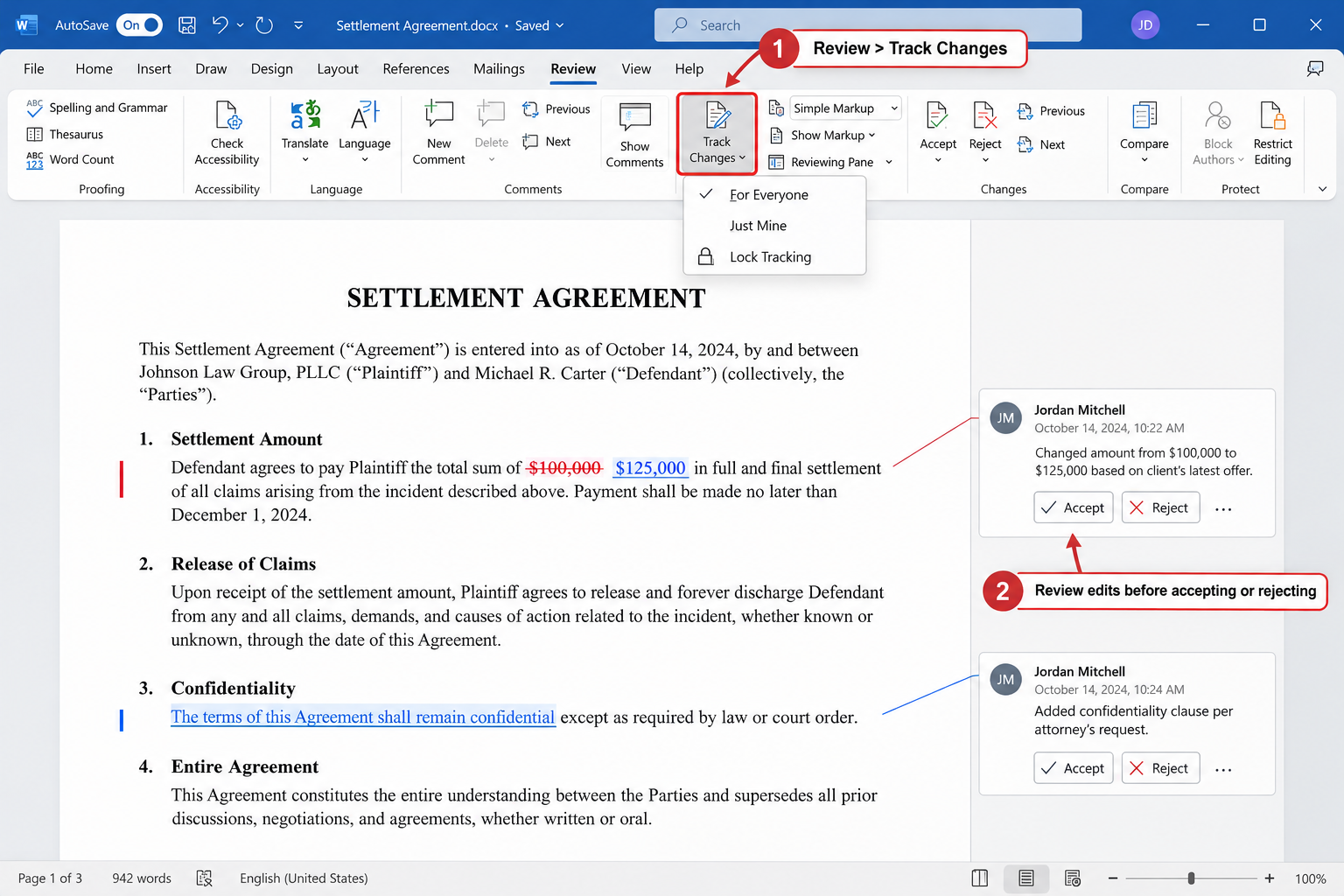
This feature is especially useful when a paralegal prepares a draft for attorney review. Turning off Track Changes does not remove revisions already recorded in the document. See Microsoft's Track Changes instructions.
Compare
Word's Compare feature identifies differences between two versions of a document. It is useful when a client or opposing counsel returns a revised agreement without tracked changes.
In supported desktop versions of Word, select Review > Compare, then choose the original and revised documents. Word can display the differences in a separate comparison document.
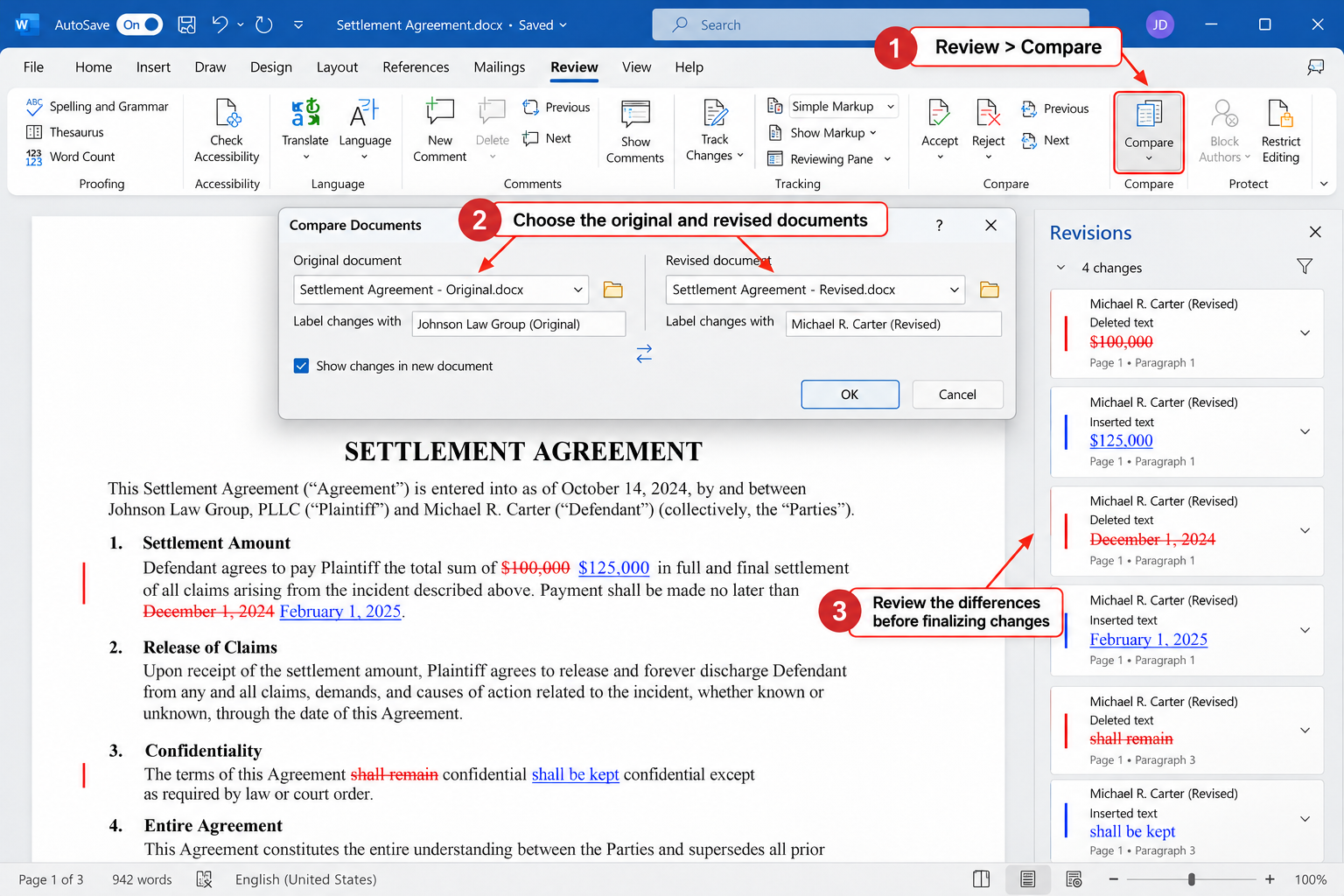
The attorney should still review the results carefully, particularly when the documents contain complex formatting. See Microsoft's legal blackline comparison guide.
Version History
Version History allows users to view or restore earlier saved versions of supported Word documents. It can help recover previous work when someone accidentally changes or removes important text.
For files stored in OneDrive or SharePoint, users can generally access Version History through the document's filename or the File menu, depending on their version of Word.
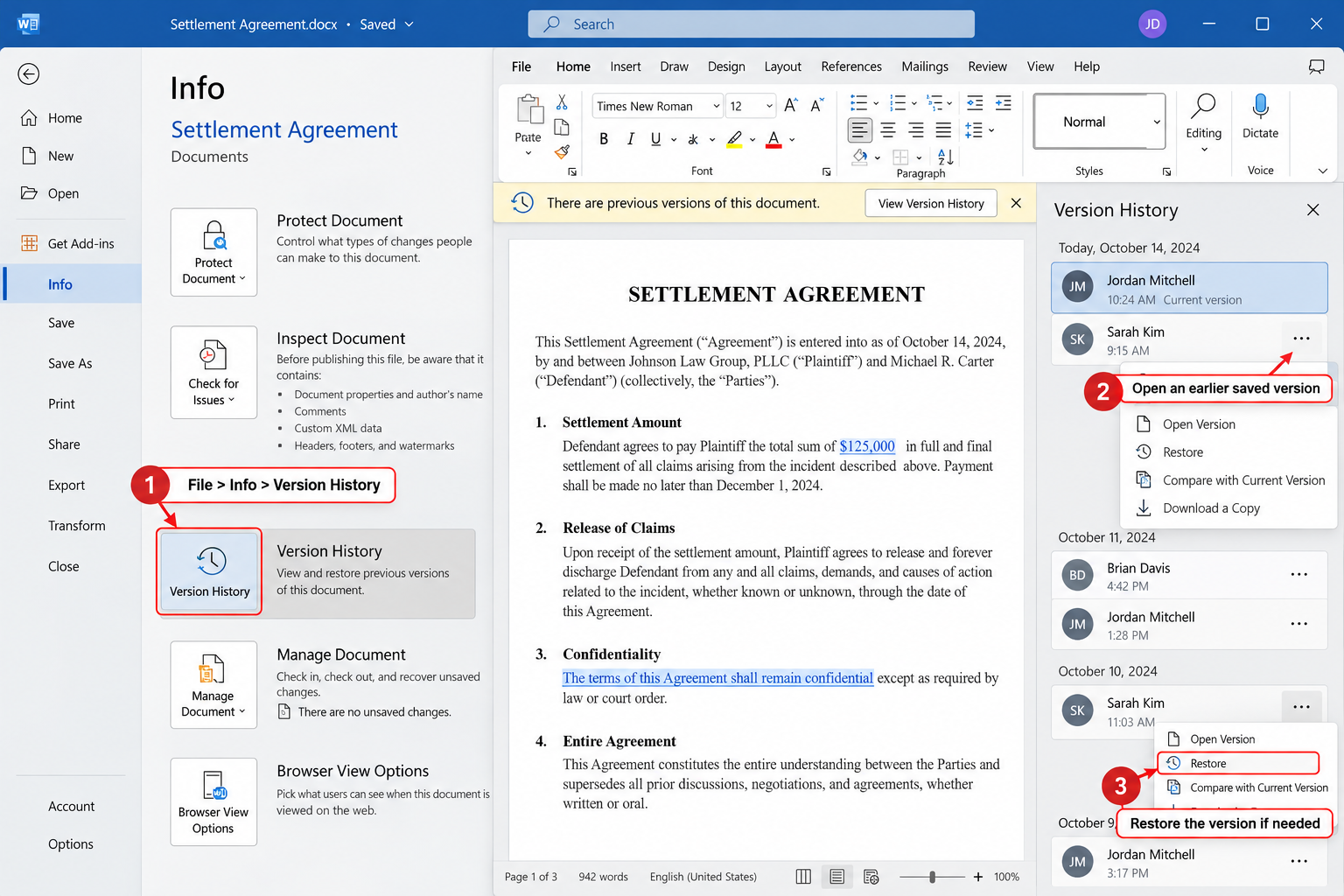
Unlike Track Changes, Version History focuses on saved file versions rather than individual edits. This makes it useful when the team needs to recover a previous draft.
Track Changes vs. Compare vs. Version History
These tools support version control, but they do not replace a firm's document review and approval procedures.
What Are the Best Practices for Legal Document Version Control?
Use Clear File Names and Centralized Storage
A standard naming system helps legal staff identify drafts and avoid confusion. For example, Smith_SettlementAgreement_v02_2026-10-14.docx identifies the document, version, and date.
Working documents should also be stored in the firm's approved shared location. This reduces the risk of staff using outdated files saved on personal devices or scattered across email attachments.
Assign Responsibility for Revisions
Each document should have someone responsible for coordinating revisions. A paralegal may organize drafts and track review status, while an attorney handles substantive legal review.
Clear responsibilities help prevent conflicting changes and make it easier to identify who should take the next step.
Review Content, Formatting, and Metadata
Tracked changes do not guarantee document accuracy. Before approval, the legal team should check names, dates, citations, numbering, cross-references, and exhibits.
They should also review comments and metadata before sharing documents externally. Any removal of information must follow the firm's applicable retention and preservation obligations. These checks can become part of a broader legal workflow management process.
Who Is Responsible for Legal Document Version Control?
Document version control is usually shared among attorneys, paralegals, and legal assistants. Their responsibilities depend on the firm's workflow and applicable supervision requirements.
For example, a paralegal may compare two versions of a contract and prepare a revised draft. The attorney then determines whether the proposed changes are legally acceptable.
Legal support staff can handle many document-related tasks, but attorneys remain responsible for appropriate supervision and decisions requiring professional judgment.
Can Virtual Legal Assistants Help With Document Version Control?
Yes. Virtual legal assistants can help law firms organize drafts, maintain file naming rules, track documents awaiting review, and prepare version comparisons.
For example, a personal injury firm may handle several demand letters and settlement agreements each week. A virtual legal assistant can organize working copies and update document status records so attorneys can focus on reviewing legal content.
These responsibilities are among the administrative tasks law firms can outsource to virtual assistants. Remote staff must follow the firm's confidentiality, security, and supervision procedures.
Virtual Staffing provides remote legal support professionals who can assist with document organization and other routine law firm workflows.
When Should a Law Firm Use Document Management Software?
Microsoft Word and organized shared folders may be sufficient for firms with straightforward document workflows. However, firms managing large volumes of documents or frequent revisions may need a dedicated document management system.
These systems can offer centralized storage, version histories, document search, and access controls. Some platforms also include audit records and approval workflows.
Before choosing software, firms should evaluate document volume, team size, security requirements, and existing tools. They can explore different legal technology tools for law firms to compare available features.
Document management also differs from legal document automation software. Automation helps generate documents using templates and structured information. Version control helps manage those documents as they change.
Frequently Asked Questions About Legal Document Version Control
What Is the Purpose of Legal Document Version Control?
Legal document version control helps law firms track revisions, manage drafts, and identify approved documents. It reduces confusion when multiple people edit the same file and helps prevent outdated versions from being used.
Is Track Changes the Same as Version Control?
No. Track Changes records edits within a Word document. Version control is a broader process that includes managing drafts, tracking document history, comparing revisions, and identifying approved versions.
Can Law Firms Use Microsoft Word for Version Control?
Yes. Microsoft Word provides Track Changes and Compare. Eligible files stored in OneDrive or SharePoint can also use Version History. Firms still need clear procedures for reviewing and approving documents.
What Types of Legal Documents Need Version Control?
Version control is useful for contracts, motions, pleadings, discovery responses, settlement agreements, and demand letters. It is particularly important when documents undergo several rounds of review or negotiation.
Who Approves the Final Version of a Legal Document?
The responsible attorney should approve documents requiring legal review or professional judgment. Paralegals and legal assistants may help prepare, organize, and distribute approved documents under appropriate supervision.
Key Takeaways on Legal Document Version Control
Legal document version control helps law firms organize revisions, identify current drafts, and reduce the risk of using outdated documents. It provides a clear process from initial drafting through final approval.
Microsoft Word offers tools for tracking and comparing changes, but firms also need clear naming rules, secure storage, and consistent review procedures.
With defined responsibilities and support from legal staff, attorneys can spend less time managing conflicting drafts and more time on substantive legal work.