


Key Takeaways
- A virtual legal assistant handles document preparation, legal research, client communication, scheduling, and case file management all working remotely on your schedule.
- Hiring through a Pre-Vetted provider is faster, more compliant, and lower-risk than sourcing independently from a freelance marketplace.
- The right candidate is U.S. Law Experienced, proficient in your case management software, and operating under a signed NDA before their first task.
- A structured 30-day onboarding plan with clear task scope and secure system access separates high-performing hires from frustrating ones.
To hire a virtual legal assistant, define the role, choose a vetted provider, screen for legal-specific skills, verify confidentiality protocols, and onboard with a clear structure.
Most law firms delay hiring because they are not sure where to start, what to look for, or how to manage someone remotely. This guide covers each step so you can make a confident hire with the criteria that matter and the shortcuts that cost you later.
From defining the role to running your first 30 days, here is exactly how to do it all using a virtual legal assistant service built specifically for law firms.
What a Virtual Legal Assistant Actually Does
Before you post a role or vet a single candidate, you need a clear picture of what this role includes. A virtual legal assistant works remotely and handles the operational and administrative side of legal work, not the practice of law itself.

Core Tasks You Can Delegate
A strong virtual legal assistant takes on a wide range of daily work:
- Document preparation and formatting: drafting contracts, pleadings, motions, correspondence, and client letters based on attorney direction
- Legal research support: pulling case law, statutes, and regulatory summaries from Westlaw, LexisNexis, or Fastcase, then compiling them into clean memos for attorney review
- Calendar and deadline management: tracking court dates, discovery cutoffs, filing deadlines, and client appointments across active cases
- Client communication: responding to emails and calls, confirming consultations, sending follow-ups, and logging all contact in your case management system
- Case file organization: maintaining digital records, managing document intake, and keeping files organized and audit-ready
- Administrative support: data entry, invoice preparation, billing support, e-filing, and timekeeping
What Stays with the Attorney
A virtual legal assistant is a support professional, not a licensed practitioner. Giving legal advice, making independent legal judgments, and signing documents in an attorney's capacity are tasks that stay with you. The ABA's guidelines on supervision of nonlawyer assistants place the responsibility for that boundary on the supervising attorney.
Why Law Firms Are Moving to Virtual Legal Assistants
The case for hiring remotely is straightforward. Full-time, in-house legal assistants carry overhead costs that extend well beyond their salary: benefits, payroll taxes, office space, equipment, and training time.
A virtual legal assistant removes most of that overhead. And when you hire from a vetted provider with U.S. Law Experienced candidates, you are not trading quality for cost savings. You are cutting the costs that were never tied to performance.
The Cost Comparison: In-House vs. Virtual
According to the Bureau of Labor Statistics, the median annual wage for paralegals and legal assistants in the U.S. is over $60,000, and that figure does not include benefits, taxes, or overhead. The total monthly cost of an in-house hire is typically much higher.
Here's how that compares to Virtual Staffing's own pricing for a dedicated virtual legal assistant:
Many law firms use offshore virtual legal assistants to support intake, case management, document preparation, client communication, and other administrative tasks. Compared to a fully loaded U.S. in-house hire, offshore legal staffing can offer significant cost savings while providing dedicated support aligned with law firm workflows.
Virtual Staffing provides dedicated virtual legal assistants who are matched to your firm's practice area, software stack, and workflow requirements. Candidates can typically start within 2 to 3 business days and work exclusively with your firm on a full-time basis.
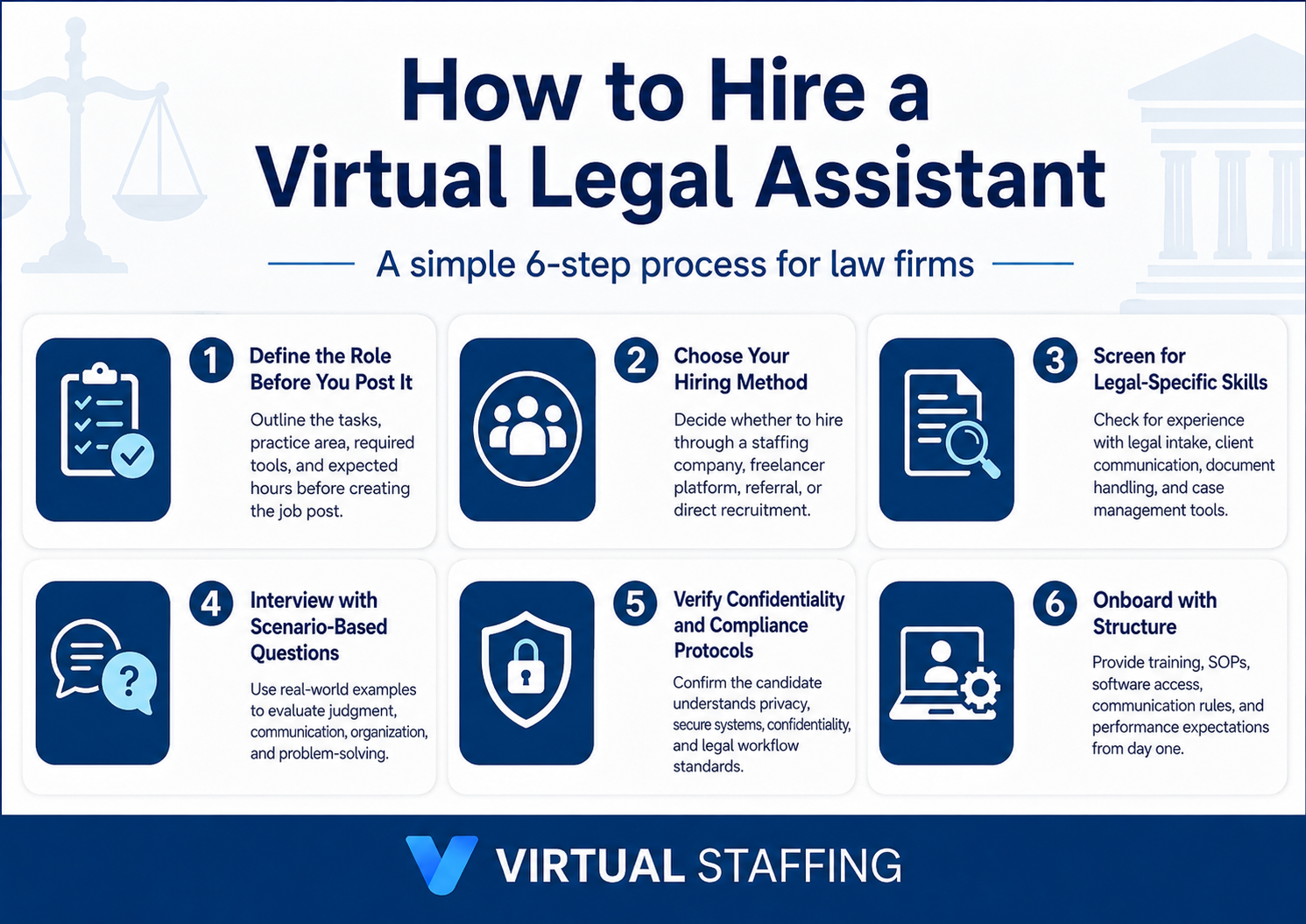
How to Hire a Virtual Legal Assistant: A Step-by-Step Process
This is the process that produces a reliable hire. Each step builds on the last, and skipping one is where most firms run into trouble.
Step 1: Define the Role Before You Post It
List the specific tasks you need handled, how many hours per week each takes, and which software the role requires. A vague posting attracts vague applicants.
Be specific: "We need someone to manage our Clio calendar, draft demand letter templates, and handle daily client email responses" is a role. "We need help with legal tasks" is not.
Step 2: Choose Your Hiring Method
You have two main paths: a Pre-Vetted provider or an independent freelance marketplace. They are not equivalent.
Provider (agency model): Candidates are pre-screened for legal experience, background-checked, and come with confidentiality agreements already in place. If a hire does not work out, replacements are handled for you. Lower risk, faster start.
Independent marketplace: You control the search and screening entirely. More flexibility, but more time, more compliance risk, and no replacement guarantee if the fit is wrong.
For most firms, especially those hiring a virtual legal assistant for the first time, a Pre-Vetted provider is the lower-risk path.
Step 3: Screen for Legal-Specific Skills
Do not rely on a resume alone. Run a short practical test before any interview.
A 30 to 45-minute skills check covers:
- Drafting a sample client letter or document from a brief
- Scheduling a hypothetical court date across a shared calendar tool
- Summarizing a short case excerpt into a clean, organized memo
This reveals more about actual capability than three rounds of general questions.
Step 4: Interview with Scenario-Based Questions
Generic interview questions produce generic answers. Use scenarios tied to your real work:
- "A filing deadline is two hours away and the attorney is in a deposition. What do you do?"
- "A client is upset about their case. How do you handle the call and what do you log?"
- "How do you organize a case file when documents arrive from multiple sources at different times?"
Listen for process thinking, not just experience. A candidate who walks you through a clear method is more predictable than one who says they have done it before without saying how.
Step 5: Verify Confidentiality and Compliance Protocols
Before any candidate accesses client information, confirm three things:
- A signed NDA covering all client and case data, in place before day one
- Demonstrated familiarity with secure platforms not personal email or unencrypted apps
- Basic understanding of attorney-client privilege and what it requires of support staff
If your work touches health-related matters, verify that your provider meets HIPAA-compliant virtual assistant standards.
Step 6: Onboard with Structure
Most failed hires fail in the first 30 days not because the candidate was wrong, but because the onboarding had no structure.
A reliable onboarding plan follows this sequence:
- Days 1 to 3: system access, software walkthroughs, and observation of active tasks
- Week 1 to 2: supervised work on real tasks with daily check-ins and immediate feedback
- Week 3 to 4: independent task completion with end-of-day summary reports
- Day 30: formal review of quality, communication, and scope fit
Give your virtual legal assistant access only to what their role requires. Document the first month's tasks and feedback. Build the working relationship before expanding their scope.
Skills and Credentials to Look For
You do not need to hire a paralegal to get strong legal support. But you do need someone with the right foundation. Here is what separates a capable virtual legal assistant from a generic administrative hire.
Must-Have Skills
- Professional written communication with legal accuracy and clear formatting
- Attention to detail on documents, deadlines, and case data entry
- Ability to follow attorney-directed workflows without improvising on legal judgment
- Reliability under deadline pressure, particularly around court filings and discovery cutoffs
Certifications Worth Noting
Formal certification is a positive signal, not a requirement. The NALA Certified Paralegal credential stands out as the only paralegal certification accredited by the National Commission for Certifying Agencies (NCCA), and it's acknowledged by the American Bar Association as a mark of high professional achievement.
Software Proficiency Checklist
Before finalizing a hire, confirm your candidate's comfort with the tools your firm uses:
Tools to ask about, by category:
- Case Management: Clio, MyCase, Filevine, Smokeball, PracticePanther
- Document Handling: Microsoft Word, Google Docs, DocuSign
- Legal Research: Westlaw, LexisNexis, Fastcase
- Communication: Microsoft Teams, Slack, Zoom
- Billing and Admin: LawPay, CosmoLex, QuickBooks
A strong candidate does not need to know every tool on this list. They should know your primary platforms, or show clear evidence they can learn new tools quickly.
Red Flags to Watch For During Hiring
Watch for these warning signs before you extend an offer:
- Vague legal experience: claims legal background but cannot describe specific tasks, tools, or practice areas with any detail
- No verifiable references: especially concerning for a role that will handle confidential client information daily
- Poor communication during the interview process: missed messages, slow follow-ups, or unclear responses during hiring reflect how they will communicate on your cases
- Unclear understanding of confidentiality: a candidate who does not immediately grasp why NDAs and data security matter is a compliance risk before they start
- Cannot name a single legal software platform: a candidate who claims legal experience but has never used a case management tool has likely overstated their background
Stop Doing Everything Yourself
A virtual legal assistant does not just save you money. It returns the time you are currently spending on tasks that do not require your legal judgment.
The firms that grow delegate early and hire well. The ones that stay stretched keep doing work that anyone with the right training could handle.
Virtual Staffing connects law firms with Legal-Trained, U.S. Law Experienced virtual legal assistants from a Pre-Vetted Talent Pool. Every hire is background-checked, trained in legal workflows, and ready to work in your existing systems. Most firms are up and running within two to three business days.
Review the best legal virtual assistant companies guide if you want a side-by-side provider comparison first or skip straight to the source.
Talk to the Virtual Staffing team and find your match within 24 hours.

Frequently Asked Questions (FAQs):
What is the difference between a virtual legal assistant and a paralegal?
A virtual legal assistant typically handles administrative and operational tasks including scheduling, client communication, document formatting, and case file management. A paralegal takes on more substantive legal support work such as legal research, case preparation, and drafting complex documents. Both work under attorney supervision and cannot provide legal advice. If your firm needs deeper research and drafting support, see the virtual paralegal services page for a full breakdown.
How much does a virtual legal assistant cost per month?
Full-time virtual legal assistants from the Philippines or Latin America typically start from $2,227/month. A fully loaded U.S. in-house hire runs $5,500 or more per month once you factor in benefits, taxes, and overhead. Most firms save 50 to 60% by hiring through a vetted remote provider.
Can a virtual legal assistant work during my business hours?
Yes. Most providers match virtual legal assistants to your time zone and business hours. If you need coverage beyond standard hours, many providers can accommodate extended schedules.
What software should a virtual legal assistant know?
At minimum, your virtual legal assistant should be proficient in your primary case management platform (Clio, MyCase, and Filevine are most common in U.S. firms), plus Microsoft Office or Google Workspace, a communication tool, and a document signing platform.
How long does it take to onboard a virtual legal assistant?
With a vetted provider, setup takes two to three business days. A structured 30-day onboarding plan covering system access, supervised tasks, and a formal quality review determines whether the hire performs well over the long term.
Do I need to disclose to clients that I use a virtual assistant?
For purely administrative tasks, disclosure is generally not required. For substantive legal work performed under your supervision, including research and document drafting, adding a brief disclosure to your engagement letter is the safest practice. Requirements vary by state, check your state bar's current ethics opinions.